25weight
Cyber exposure
Weaknesses visible from the outside on the supplier's web addresses and servers. The data comes from the Cyber risk – Basic module.
Risk Score checks your suppliers against sanctions lists, company registers and country risk. The result is a risk score from 0 to 100, where higher means greater risk. The check runs again every night, and you are notified of a new hit or when the risk level changes.
The supplier gets a score from 0 to 100. The higher the score, the higher the risk. You change how much each factor weighs in the settings.
Weaknesses visible from the outside on the supplier's web addresses and servers. The data comes from the Cyber risk – Basic module.
Whether the company is registered, has F-tax (Swedish business tax status) and VAT registration. A company deregistered or being wound up is flagged as an invalid counterparty.
Sanctions lists from the EU, UN, US and UK, and the US list of companies excluded from federal contracts. A certain or confirmed sanctions hit always means Critical.
The risk of corruption and weak governance in the country where the supplier is based, according to Transparency International and the World Bank.
Negative news and media coverage about the supplier. Available in the Value tier, with your own ComplyAdvantage account.
How well the supplier meets the requirements in your assessments. The data comes from the Vendor assessment module.
The score places the supplier in one of four risk levels: Low, Medium, High or Critical.
Sanctions hit: always Critical, however the weights are set.
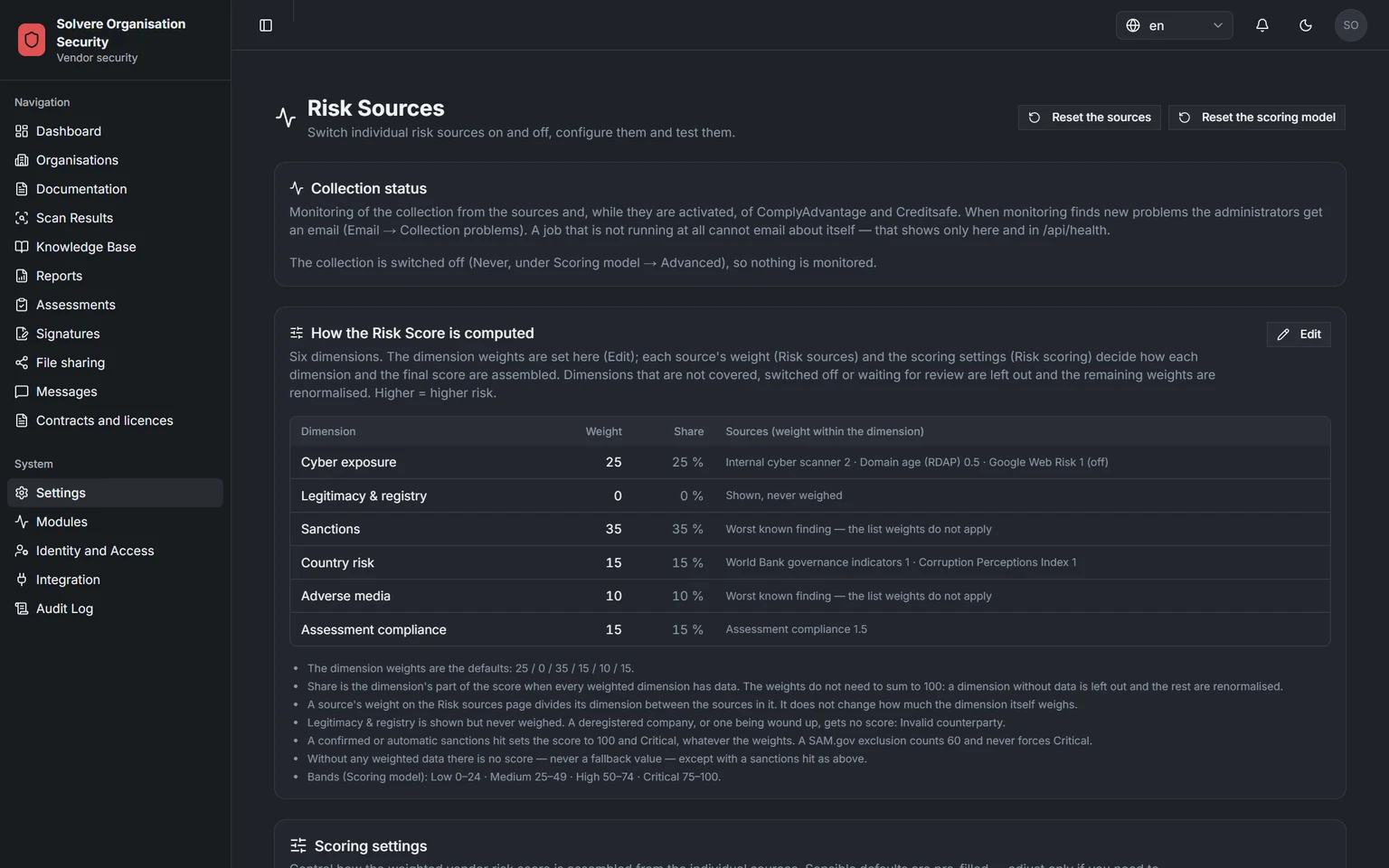
Screenshots from a demo environment with made-up suppliers.
The ring shows how the score is built, with one part per factor. On the supplier's page you see which factor drives the risk up. Scroll through the steps, or click one.
Every customer gets its own separate environment with its own database, in Sweden by default. Hosting can be adapted to your requirements. The environment fetches the data from the open sources below on its own.
Open sources
Sanctions lists, company registers, country risk and a website check. Included in the module at no extra charge.
Your ComplyAdvantage account
With your own agreement and account at ComplyAdvantage, you get more sources directly in Risk Score.
Creditsafe
With your own agreement and account at Creditsafe, you get credit reports directly in Risk Score.
The check runs in your own environment. Possible hits land in a queue where your staff confirm or dismiss them, and every decision is saved.
Once you have recorded the supplier's consent, for example with a signed document, the check can start right away.
Your environment fetches data from the lists and registers above.
The supplier's name and its parent companies, according to the global GLEIF register, are compared with the sanctions and exclusion lists.
Possible hits wait in the queue until someone with the right permission has looked at them. An uncertain hit means Critical only once it is confirmed.
Confirm or dismiss the hit. Decisions are kept in a history you can show afterwards.
Every night your active suppliers are checked again. You are notified of a new hit or when the risk level changes.
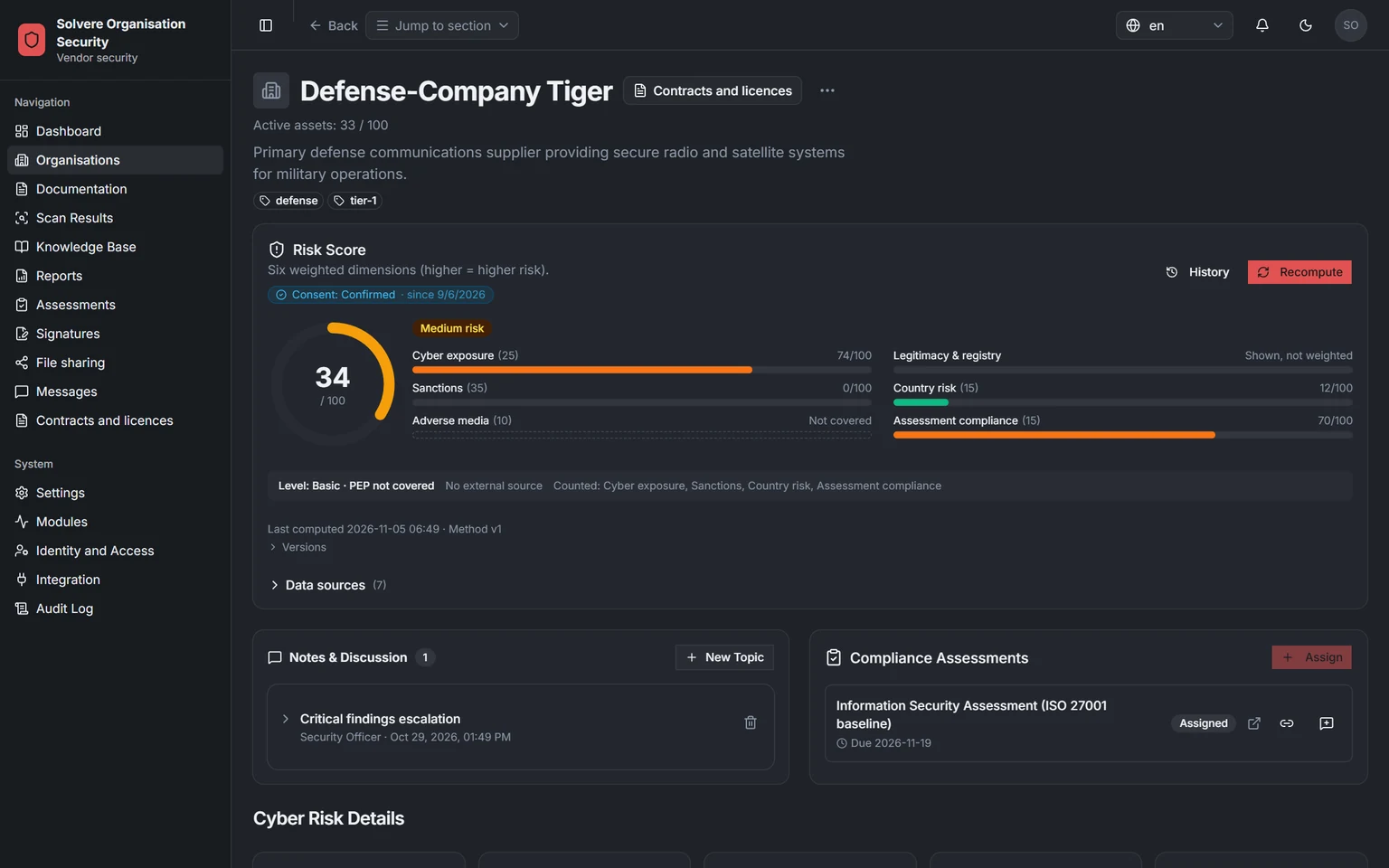
Risk Score on the supplier's page: score, risk level and the six factors. Screenshots from a demo environment with made-up suppliers.
By default no supplier is checked until its consent is recorded. You can also require a document that proves it.
For a sole trader the registration number is a personal identity number. It is never sent to any source, and the sanctions check uses the name.
The supplier never sees the hits or your review in the vendor portal.
Keep managing your supplier register in SAP or your business system, and let it fetch the risk score through a documented interface (API).
Part of the core platform
Results from the modules you have
Risk Score automatically gives a score based on external sources and your assessments. Risk management is your own risk register: you assess the risks in your business and at your suppliers, decide on actions and follow them up.
In 30 minutes we show how you send questions to a supplier, review the answers and sign the decision. Then we work out a price that fits you.