From template to signed contract
Stop emailing contract drafts back and forth. You write the contract from your own template, negotiate with the other party in the same document, sign digitally and get a reminder before it is due for renewal.
- Your own templates and standard texts
- Joint review with the other party
- Signing in the Signatures module, BankID as an option
- Reminders for late replies and before renewal
From template to reminder
You prepare the contract on your side. The other party signs in to the portal with their own account and reads, comments and suggests changes right in the contract. The portal is always included and costs the other party nothing.
-
1
Create templates and standard texts
Write your templates once and reuse the standard texts. A changed template becomes a new version, so contracts already written are not affected. Important sections can be locked.
-
2
Make a contract for each counterparty
Start from a template, for example a non-disclosure, data processing or licence agreement. The other party's name, registration number and contact details are filled in automatically.
-
3
Share the contract with the other party
Choose who at the other party takes part. The contract waits for them under My tasks in the portal, and they get a notification. They see the changes from the moment you shared, but never your internal drafts.
-
4
Comment and suggest changes
Both parties can edit sections that are not locked. What is added and removed shows in each person's own colour. A comment stays with its text even when the text changes.
-
5
Lock the version you agree on
When every question is settled you lock the version as a finished file (PDF). It gets a table of contents, page numbers and your confidentiality label, and can no longer be changed.
-
6
Sign digitally
The signatories on both sides sign the locked version in the Signatures module. The document is sealed and the signature can be checked on a public web page. BankID is available as an option.
-
7
Get reminders about replies and renewal
Set a date for the other party's reply and a renewal date, ideally the last day to give notice. If the reply is late, a follow-up appears under Tasks for whoever is responsible for the contract, and a reminder comes 30 days before the renewal date.
The contract, step by step
Follow a contract from template to signature and reminder. Scroll through the steps, or click one.
Negotiate in one document
What matters stays put
You decide which sections cannot be removed, edited or moved. That applies to both parties.
Every change shows
For every addition, deletion or move, you keep who made it, for which party and when. Both parties see the same history.
Comments on the right text
A comment stays attached to the text it is about, even when that text changes. When you agree, you mark the question as settled, and it can be reopened if needed.
Nothing gets overwritten
Templates, saved changes and shared versions are kept apart. If two people save at once, you see the difference, so nobody overwrites the other.
Spot missing contracts
A table shows which contracts each supplier has and which are missing. A to-do list shows what is waiting for you.
- Rules for which contracts are required. Decide which contracts a supplier must have, by risk level, classification or your own labels. For example: every high-risk supplier must have a data processing agreement.
- Many contracts at once. Choose templates and suppliers and create all the contracts in one go, as drafts on your side or shared straight with the other party.
- Missing contracts are created for you. The rules can create drafts of contracts that are missing. You decide when they are shared and signed.
- The to-do list. Missing contracts, open comments, late replies, renewals within 30 days and contracts based on an older template.
| Supplier | Non-disclosure | Data processing | Licence agreement |
|---|---|---|---|
| Hosting provider | Signed | Signed | Under review |
| Software vendor | Signed | Draft | Signed |
| Consultancy | Finalised | Under review | Missing |
| Subcontractor | Missing | Missing | Draft |
Example with made-up suppliers. You decide which contracts are required.
Sign exactly the version you agreed on
The finished version is saved as a locked file (PDF). That very file is what gets signed, so what is signed is what you agreed on.
- A clean file, ready to archive. Table of contents, page numbers and your confidentiality label are included.
- Both parties sign. You choose who signs, at least one person on your side and one at the other party.
- BankID as an option. With the option you choose for each document whether it is signed with BankID, the Swedish electronic ID, or with the platform's own signature.
- No last-minute changes. A new draft never replaces what has already been sent for signing.
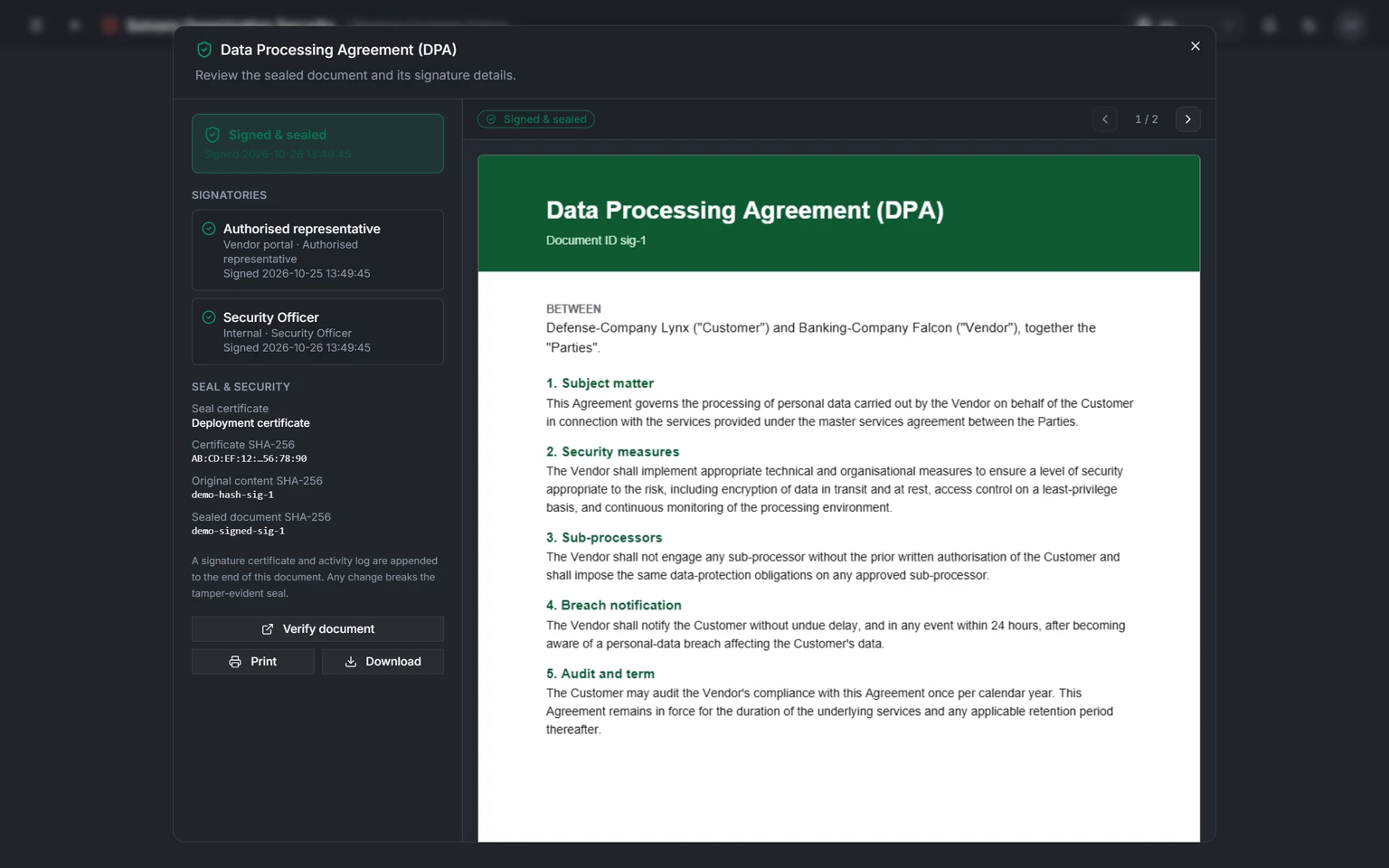
A signed and sealed contract in the Signatures module: who signed and when, and a button to check the signatures. We are happy to show the contract work itself in a demo. Screenshots from a demo environment with made-up suppliers.
Renew or cancel in time
You see in good time which contracts need renewing: the ones you write here and other signed documents the platform already tracks.
- A date of its own for each contract. The contracts you write here give a reminder 30 days before the renewal date.
- Other signed documents too. Switch it on in the settings. Approved vendor assessments are then tracked too, and you get a notice once something has expired.
- You choose periods and reminders. The reminders assume a document is valid for one year unless you choose another period, for example two years for non-disclosure agreements. You also choose how far ahead they come.
- Everything due for renewal in one place. The dashboard collects everything that needs renewing or runs out soon.
Questions about contracts and licence agreements
Who sees what?
The other party sees only the versions you choose to share, and the changes from the moment you shared. They never see your templates, internal drafts or overviews. On your side, everyone sees only what their permissions give them.
Does the other party need any software of their own?
No. The other party signs in to the portal with their own account and works right in the browser. It costs them nothing.
Can we sign with BankID?
Yes. BankID, the Swedish electronic ID, is an option. When it is switched on you choose for each document whether it is signed with BankID or with the platform's own electronic signature. Signing is done in the Signatures module.
What happens to contracts when the template is updated?
Existing contracts do not change, so what you have negotiated stays in place. To use the new template version, you create a new draft from it. The to-do list shows which contracts are based on an older template.
Can we try the module first?
Yes. Solvere can let you try the module for an agreed period, so you test it with your own contracts before it is added to the licence.
What does the module cost, and what counts as a seat?
The module costs 6,000 SEK/month (72,000 SEK/year). On top of that comes the core platform, 4,100 SEK/month, and for signing the Signatures module, 4,500 SEK/month, unless you already have it. On first purchase there is a one-off onboarding fee: 20,000 SEK for the module and 45,000 SEK for the core platform. Add the module to a licence you already have and no onboarding fee is charged. Only the contracts you want reminders for count as seats, for example before renewal or the notice deadline, and 25 are included. If you need more, there are tiers of 100 contracts (+25% on the licence) and 250 contracts (+50%), and more than that on quote. The tier is set by the module that counts the most, and the percentage applies to the whole licence. All prices excl. VAT. The full calculation is on the pricing page.
See what your contract work could look like
A demo takes 30 minutes. We show how you go from template to signed contract without emailing drafts back and forth and how the reminders work, and work out a price that fits you.