You decide who sees what
Give each person the access their job needs, and let it end on a date you choose. You get your own installation and database, shared with no other customer, hosted by Solvere in Sweden by default, or in your own environment on request. Hosting can be adapted to your requirements.
- Identity and Access always included
- Sign-in with Microsoft Entra ID
- Dedicated installation and database in Sweden
- Separate sign-ins for staff and suppliers
The right access for every job
You decide who may do what, down to each function. A role decides what someone may do in a module, and a group gathers the roles a job needs. New accounts start with no permissions, and every page, button and action is checked against the same rules.
Ready-made groups for common jobs
Purchasing, IT security, Compliance, Legal, Management, Audit, IT administration, Service desk and Administrator. For suppliers there are Contact person, Technical contact and Signatory. Adjust them or create your own.
Roles that are easy to understand
Roles come in levels with the same names everywhere: Reader, Contributor, Manager, Administrator and Full access. Each module has only the levels it needs. Built-in roles are locked so nobody changes them by accident, and your own roles can start as a copy of a built-in one.
Only the suppliers you work with
Staff work only with the suppliers they have been added to. Anyone who needs to work with every supplier gets a role that covers them all. A supplier sees only its own organisation.
The screen shows what the job needs
Menus, tabs and buttons follow the permissions. What a person has no permission for is not shown, so everyone sees what is relevant to their work. Giving someone a task never changes what they have access to, and who sees the costs in Finance is set separately.
Temporary access that ends on its own
Give a role or group until a set date, and it stops applying on its own. A reminder can go out beforehand. Whoever may grant the role can extend it, never the person themselves.
Microsoft Entra ID drives staff access
Staff can sign in with their Microsoft 365 account. In Entra ID you give them app roles, meaning roles for the platform. At every sign-in the person gets the groups and roles you have linked to those app roles, and anything removed in Entra ID is removed. Permissions you give directly in the platform are managed there.
Nobody changes their own permissions
Handing out the most powerful roles, such as Full access, requires a special permission. Every change to permissions appears in the audit log in plain words.
The supplier manages its own accounts
You can let a named person at the supplier manage their colleagues' accounts, for example add and remove them. You choose who that is, and whether it applies to all suppliers or only some.
You set up access and sign-in yourselves
Who holds which role and group is managed under Identity and Access. Sign-in, password rules and the rules for temporary access are set under Settings.
- Separate sign-ins. Staff and suppliers sign in at different addresses, and the staff part of the platform can be limited to your own network.
- Entra ID or password. You choose the sign-in method separately for staff and suppliers. One of the methods always stays on, so you never shut off sign-in by mistake.
- Password rules and lockout. You set the password rules. After several failed sign-in attempts, sign-in is locked for a while.
- An overview of every account. Search and filter on group, role and status, and see at once which accounts have no permissions.
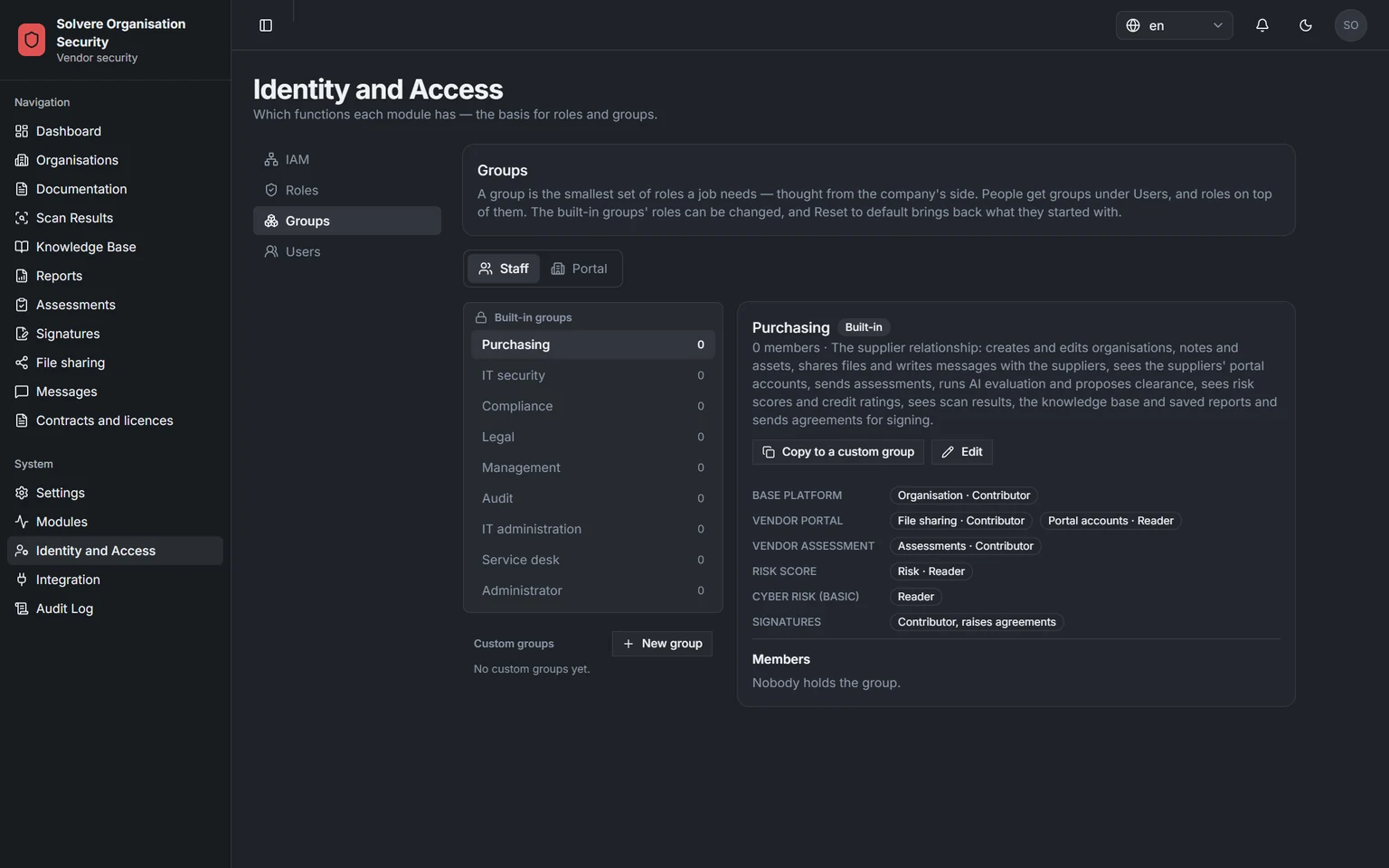
Screenshots from a demo environment with made-up suppliers.
Separate entrances and clear levels
Staff and suppliers sign in at different addresses. The roles are built like a staircase: each level may do everything the levels below may do, and a little more. Scroll through the steps, or click one.
See who did what, in plain words
The audit log shows what has happened in plain words, in Swedish or English. Notifications go only to people allowed to see what they are about.
- Events in plain words. The log shows, for example, that a person was added to a group, with role, module and end date.
- Notifications to the right people. The reviewer is told when a supplier has sent in its answers. The decision-maker is told when a supplier check finds a hit, and whoever follows up agreements when one is about to expire.
- You decide how long. You set how long events are kept, and the log can be exported for further analysis.
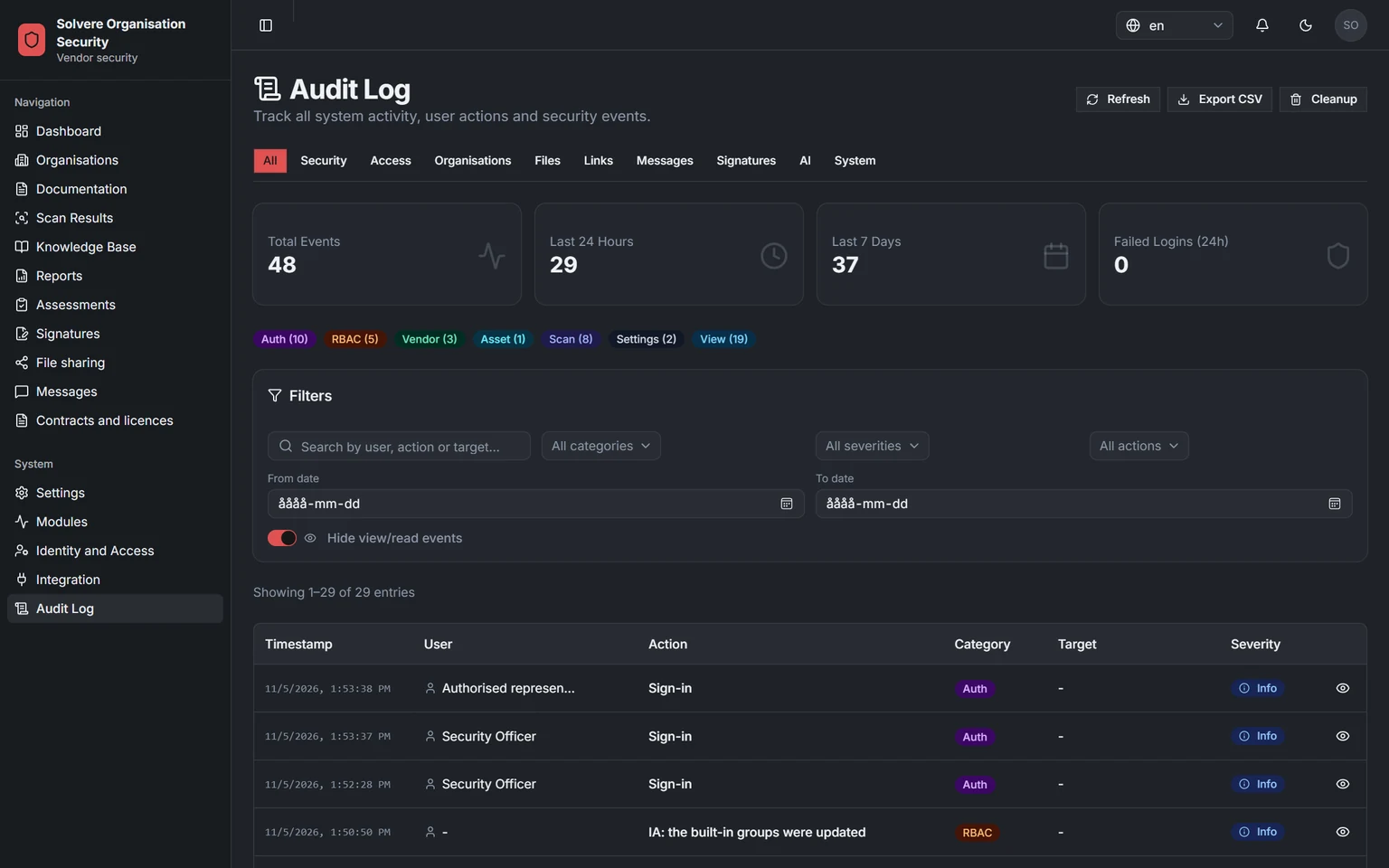
Screenshots from a demo environment with made-up suppliers.
A dedicated installation for every customer
The same software, hosted by Solvere in Sweden by default, or in your own environment on request. With Application support, Solvere is third-line support behind your own service desk. With Managed, Solvere does the work for you. See pricing and onboarding
Hosted by Solvere in Sweden
You get a dedicated installation and your own database in Solvere's cloud environment at Microsoft Azure in Sweden, at an address of its own. Staff sign in with Microsoft Entra ID.
- Dedicated installation and own database
- Microsoft data centres in Sweden (Sweden Central)
- An address of your own
- Sign-in with Microsoft Entra ID
Run in your own environment
Would you rather have the platform in your own environment? Then the same software is installed on your own servers or in your own cloud, and you choose who runs it.
- The same software as in Solvere's hosting
- You run it, or we do: remotely, via your remote desktop or together with you via screen sharing
- Onboarding is adapted to your environment
Try a module before you decide. Solvere can switch a module on as a trial in your installation for an agreed period, so you see it with your own data before it is added to the licence.
External services, module by module
Every customer has a dedicated installation and its own database. Here you can see which external services each module uses and what it checks.
Core platform: portal, file sharing, Identity and Access, Tasks and Finance
Always part of the licenceSign-in with Microsoft Entra ID or with an account and password. Shared files and task attachments are stored encrypted in your installation.
Microsoft Entra ID
Risk Score and screening
ModuleYour installation fetches data from these sources and compares it with your suppliers. The check runs again every night.
Sanctions lists from the EU, UN, US (OFAC) and UK (OFSI) · US list of excluded suppliers (SAM.gov) · Bolagsverket, the Swedish companies register · Swedish Tax Agency registrations via Statistics Sweden · EU VAT register (VIES) · Group structure (GLEIF) · Country risk from Transparency International and the World Bank · Google's list of harmful websites (Web Risk)
For more sources you can connect ComplyAdvantage, a service for sanctions, watchlists and adverse media, with your own account. By default a supplier is checked only once consent has been recorded for it. A sole trader's registration number is the owner's personal identity number and is never sent to any of the sources.
Risk management
Being introducedAll the work stays in your installation. Approved assessments and confirmed Risk Score hits can be brought in as evidence.
No external services
Cyber exposure
ModuleThe installation checks the domains and IP addresses you monitor, the way an attacker on the outside sees them. This is what is checked:
Protection against spoofed e-mail (SPF, DMARC, DKIM) · Encryption of traffic (TLS) · Open ports into the server · The web server's security settings (HTTP headers) · Subdomains you may not know about, taken from public registers of web certificates
Signatures
ModuleDocuments are signed in your installation and sealed with a digital stamp. BankID is used when you choose it for a document.
BankID, add-on per document
Anyone who has received a signed document can check that it is genuine on a dedicated page, without signing in.
Contracts and licences
ModuleTemplates, drafts and finished agreements stay in your installation. The supplier sees only what you share in the portal.
No external services
Agreements are signed with the Signatures module.
Vendor assessment: AI evaluation
Being introducedSuppliers' answers can be analysed with AI, by default in Microsoft's Azure OpenAI service in an environment Solvere has within the EU. Names, personal identity numbers and email addresses are hidden first. A reviewer goes through the result before it is used, and the AI never makes decisions.
Azure OpenAI within the EU
Where and how the AI runs can be adapted to your requirements.
SAP and other business systems
Your business system, such as SAP, can send in suppliers and fetch risk scores, assessment status, cyber check results and reports from your modules.
Documented connection for your developers (REST API) · Access keys that only reach what you choose · Protection against overload (limit on the number of calls) · Only approved addresses may connect
Suppliers blocked in your business system are deactivated in the platform, without anything being deleted.
Security in every new version
Every new version is checked with automated tools, and the security work builds on a documented security review. Have you found a security flaw? Report it via the contact page
Checked against the most serious risks in web services
We have documented what in the platform needs protecting and against which threats. The code is checked against the OWASP Top 10 (2025), the well-known list of the most serious security risks in web services.
Automatic review of the code
Every new version is automatically searched for known kinds of security flaws, in our own code and in the ready-made software parts we build on. Automated tests also check that the platform's functions are connected to the permission rules.
See how you take control of your suppliers
In 30 minutes we show how you send questions to a supplier, review the answers and sign the decision. Then we work out a price that fits you.