Module · Cyber exposure

Weak spots in websites and e-mail, found and explained

You add the web addresses of the suppliers you want to monitor. The platform checks them automatically on a schedule and shows the weaknesses it finds, called findings. Each finding is explained, and everything is collected in reports you can pass on.

  • Your own separate environment, in Sweden by default
  • Every weakness graded by severity
  • Automatic checks on a schedule
  • Counts towards the overall Risk Score

What the platform finds, and what it means

You start with the supplier's web address, such as company.com. If you also have the addresses of their servers (IP addresses), you can add those too. The checks run in your own separate environment, and the results are stored in your own database. Hosting can be adapted to your requirements.

Protection against fake e-mail

Can someone send e-mail that looks as if it came from the supplier? The platform checks that the protections are in place and strict enough.

Technical terms: SPF, DKIM and DMARC

A secure connection to the website

Checks that the website's certificate is valid and when it expires. The certificate gives the padlock in the browser. Old, insecure encryption versions are flagged too.

Technical terms: TLS and certificates

Open entry points to the servers

Shows which entry points to the supplier's servers are open to the internet and what sits behind them. Every open entry point that isn't needed is a possible way in for an attacker.

Technical term: open ports

Basic protection on the website

Checks that visitors always end up on the encrypted version of the site, and that the site has the settings that protect against known types of attack.

Technical terms: HTTPS and security headers

Addresses that are easy to forget

Finds forgotten web addresses, such as test.company.com, by searching public certificate records. Such addresses are often less well looked after. You choose which ones to monitor.

Technical terms: subdomains and Certificate Transparency

One combined score per supplier

Every finding is graded by how serious it is. Together the findings become a cyber score that shows where the supplier stands.

By default, the cyber score makes up a quarter of the supplier's overall Risk Score. You can change how much it counts.

From check to finished report

The picture shows a check. Each block is an address, and a sweep of light passes over them. What needs fixing rises and is marked with an exclamation mark, higher the more serious it is. Finally the report is ready. Scroll through the steps, or click one.

Every finding explained, so it can be fixed

A finding only helps if someone understands it. That is why every finding has an explanation and stays on the list until it is fixed. The history shows when it was fixed.

  1. 1

    Finding

    Every finding graded by severity

    Findings are listed per supplier and address, with type, description and the technical details the person fixing it needs. You can choose to show only the most serious.

  2. 2

    Knowledge base

    What the finding means and what should be done

    In Cyber risk – Basic, every type of finding has a short explanation of what it is. With the Cyber risk – Advanced add-on (see below) you also see what the finding can mean for the business and how to fix it, step by step.

  3. 3

    Action

    Fix it, check again, see it gone

    Once the supplier has fixed the problem, the finding disappears at the next check, and the history shows what happened. If you like, the supplier can request a new check itself in the vendor portal.

Reports you can pass on

One report per supplier, to download or send by e-mail. Every version is kept.

  • Saved versions. You see when each report was sent or downloaded, including when your own systems fetched it.
  • E-mail. Send the report straight to the supplier's contact person.
  • Automatic checks. You decide how often the checks run, with one schedule for everyone or a set day and time for a particular supplier.
  • Checks on demand. Start a check yourselves whenever you need to. You and your colleagues can see how far it has got.

Findings and reports can also be fetched automatically into other systems you use. How the platform connects to your systems

Basic shows where things stand, Advanced adds the guidance

Cyber exposure comes in two levels. Cyber risk – Basic gives you the checks, the findings, the cyber score and the reports. The Cyber risk – Advanced add-on gives you the full knowledge base and reports with your own logo. Both together make up the Cyber Exposure bundle.

Module

Cyber risk – Basic

Everything needed to see and follow up the suppliers' weak spots in websites, e-mail and servers.

  • Checks of e-mail protection, certificates, open entry points, website protection and forgotten addresses
  • Findings graded by severity, with history per address and supplier
  • A short explanation of every finding
  • Cyber score per supplier
  • Automatic checks on a schedule
  • Reports with saved versions, to download or send by e-mail
7,500 SEK/month90,000 SEK/year
Add-on

Cyber risk – Advanced

For those who want to give suppliers concrete steps to fix the problems, in reports with your own logo.

  • The full knowledge base: how an attack could happen and how to fix the finding, step by step
  • Reports in your own brand: logo, title, colours, footer, contact details and watermark
  • Choose which sections the report has and add your own disclaimer
  • Reports with the knowledge base's explanations and remediation advice
3,500 SEK/month42,000 SEK/yearAdded on top of Cyber risk – Basic
12,850 SEK/month

154,200 SEK/year · Separately 15,100 SEK/month: core platform 4,100 + Basic 7,500 + Advanced 3,500

Core platform, Cyber risk – Basic and Cyber risk – Advanced for one price. 25 monitored addresses are included in both modules, and larger tiers are available. Each web address or IP address counts separately; the supplier itself does not count. List price, SEK excl. VAT.

Price your licence

Let the supplier see its findings and fix them

The vendor portal is part of the core platform. There you can show the supplier its own addresses, findings and reports, so it can fix what is needed. You choose what is shown.

  • Addresses: the web addresses and IP addresses you have added, with the findings for each.
  • Results: the overall level, findings per type, individual findings and advice on fixing them. You choose which of these are shown.
  • Reports: the reports you have produced, ready to download.
  • New check: the supplier can ask for a new check, and the request goes to your staff.

Simplified view of the settings.

What it looks like

Four views: the findings, the knowledge base, the reports and the supplier's page.

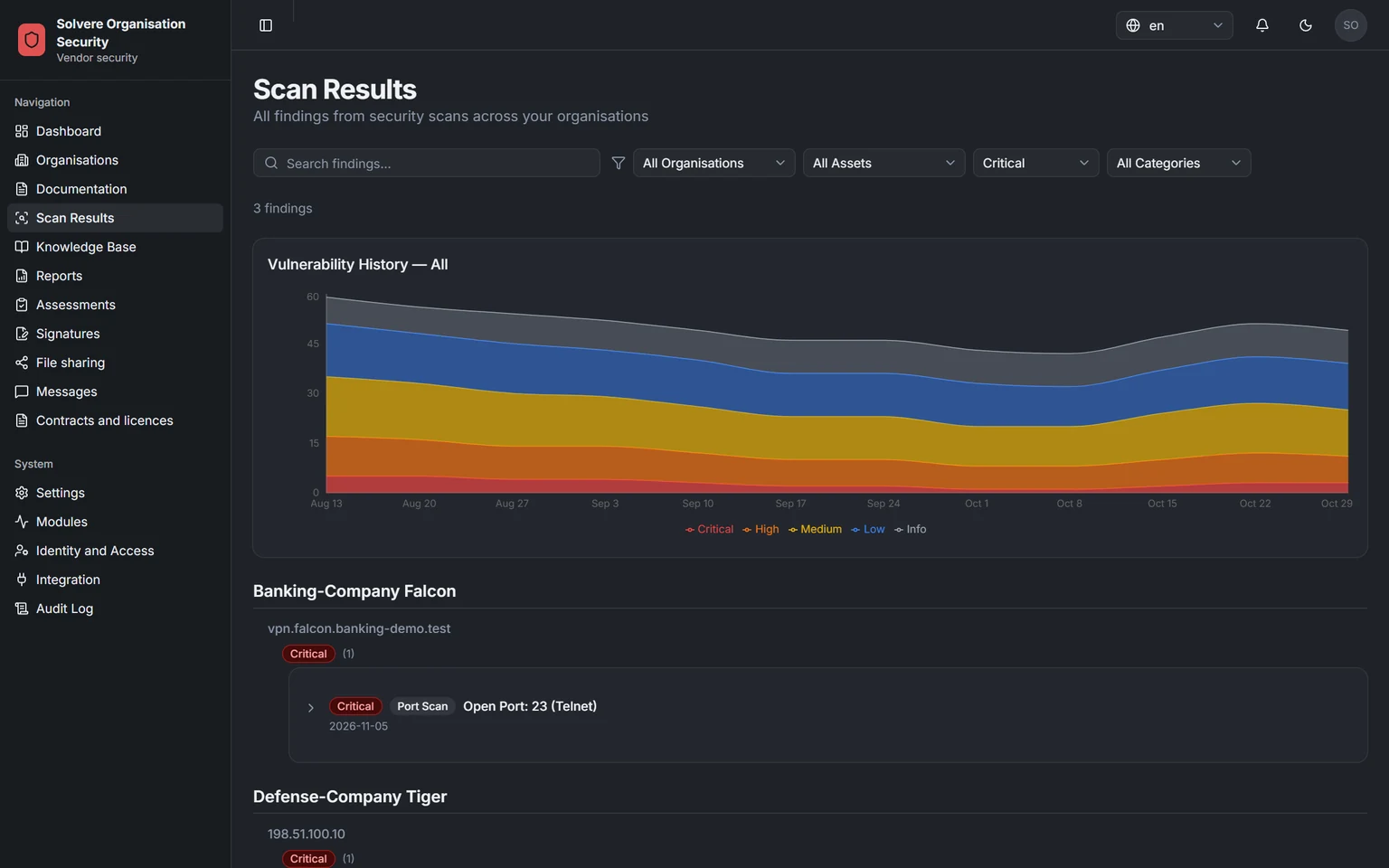
Findings per severity over time, with filters for supplier, address, severity and category
01 / 04 Cyber exposure

All findings, by severity

All findings from the checks. Filter by severity, type, supplier or address.

Screenshots from a demo environment with made-up suppliers.

See how you take control of your suppliers

A demo takes 30 minutes. We show how you find and follow up weak spots at your suppliers, and work out a price that fits you. If you want to add a module, you can try it with your own data first.